The interview is rigged.
Now you have an edge.
Hundreds of applicants per role. Six rounds to a rejection. LeetCode Hard for a job that is 90% meetings. StealthCoder gives you real-time AI help no one can see, built by an Amazon engineer who has been on both sides of the table.
7-day free trial · Cancel anytime · Mac + Windows
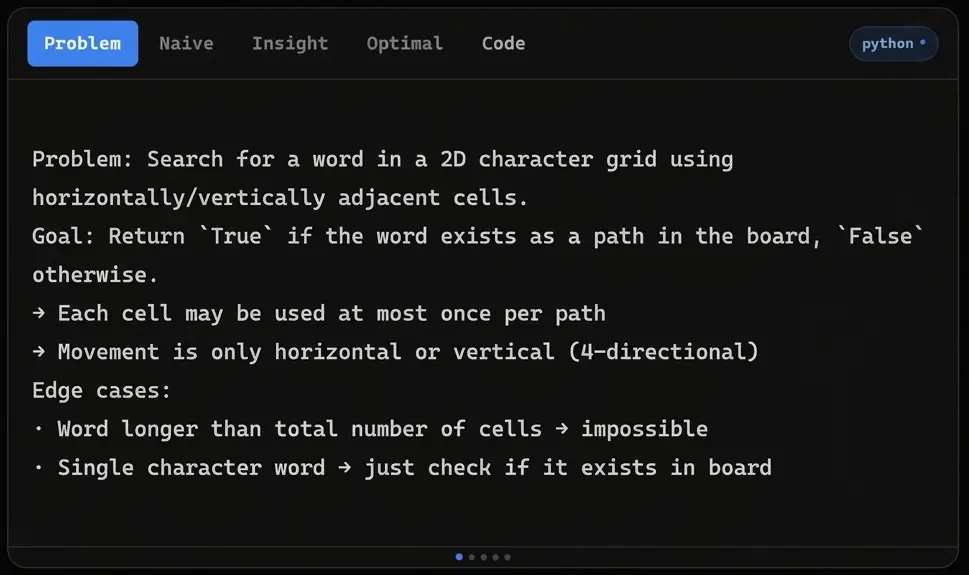
// the reality
The system was not designed for you.
The market is brutal and the interview format is broken. Everyone is playing the same rigged game.
Applicants per senior role.
Most candidates never hear back. You compete against offshore talent, AI resume filters, and candidate farms gaming the same funnel.
Interview rounds before a rejection.
Take-homes, phone screens, system design, live coding, behavioral, offer review. All unpaid. All unguaranteed.
Of the job is meetings.
Yet you are asked to reverse a binary tree in 45 minutes with a stranger watching your screen.
Factor: passing the coding screen.
Not your experience. Not your projects. Whether you can solve an algorithm problem under pressure. Cold.
// how it works
From problem to solution in 2 seconds.
No setup. No switching windows. No one knows.
Download and launch.
Install on Mac or Windows in under two minutes. No setup, no config, no account required to try.
Open your coding interview.
Join your Zoom, Google Meet, or browser-based session as normal. StealthCoder runs silently in the background.
Trigger AI with one shortcut.Ctrl+Alt+1
The overlay captures the problem on your screen and routes it to the AI instantly. No mouse, no switching windows.
Get a full solution in under 2 seconds.
Runnable code. Time and space complexity. Step-by-step explanation. In your language of choice.
Stay invisible the entire time.
The overlay does not appear in screen shares, recordings, or Zoom. Zero footprint. Completely private.
// why stealthcoder
Every detail built for the interview room.
Not a generic AI wrapper. Purpose-built for what happens when the clock is running.
Mac and Windows, natively.
A real desktop app. No browser extension, no localhost server. Runs quietly at the OS level where screen share filters apply.
The latest and strongest AI models.
Powered by the latest version of Claude and updated as better models release. You always get the best available.
Full solution in under 2 seconds.
Reads the screen, reasons over the problem, returns clean code with explanation and complexity. Before the awkward silence hits.
Two tools in one subscription.
StealthCoder for coding rounds. StealthDesign for system design. Same shortcut, same overlay, fully integrated.
Zero screen share footprint.
Invisible on Zoom, Google Meet, Teams, and browser recordings.
See tested platforms →Built by an Amazon engineer.
Designed by someone who has interviewed at top companies and run interviews too. Every feature was built with that context.
// testimonials
Engineers used it. Engineers got hired.
1,200+ engineers used StealthCoder to pass live online assessments across 200+ companies. 5,400+ interviews hedged since launch.
Used by candidates at
“I used it on three rounds back to back. Passed all of them. Got the offer. I was not going to get that role without this.”
Marcus T.
Senior SWE, hired at a FAANG
“The system design overlay saved me twice in one interview. The interviewer had no idea. Two seconds and I had a full diagram breakdown.”
Priya N.
L5 SWE, hired remotely
“I have been applying for six months. First time I felt calm in a live coding round. That calmness alone changed how I came across.”
James K.
Mid-level engineer, Series B startup
“I was skeptical it would actually be invisible. It was. Used it on a recorded HackerRank. Nothing showed up.”
Devon R.
Backend engineer, fintech
“Worth every dollar. One offer letter and the annual plan pays for itself ten times over.”
Saanvi P.
Frontend engineer, big tech
“The explanation it gives is better than most editorial solutions on LeetCode. I actually understand the answer when I type it out.”
Tomás A.
New grad, first SWE role
Know what they'll ask
before you walk in.
The interview isn't random. The same problems recycle across hundreds of companies. We mapped the entire graph.
1,130 leaked OAs. Reported by real candidates.
Every Online Assessment leaked from real candidates across OpenAI, Anthropic, Amazon, Stripe, Citadel, and 130 more. With the pattern, the pitfall, and the hedge if you blank.
469 companies. Reported interview questions.
Every reported coding interview question by company. Amazon, Stripe, Citadel, JPMorgan, and 465 more. With topic breakdowns and the honest play for each.
1,923 problems. Who asks what.
Every recycled LeetCode problem with which companies actually ask it. Frequency-ranked, acceptance-rate tracked.
71 algorithmic patterns.
Dynamic programming, two pointers, graphs, sliding window, all 71. Drilled by which companies and how heavily.
// pricing
One offer pays for years of this.
Annual works out to $15 a month. Monthly and a 7-day free trial are also available.
Free Trial
Card required. Renews at $40/mo. Cancel anytime.
- →Full access for 7 days
- →AI code solutions + explanations
- →System design mode included
- →Invisible on all screen shares
Annual Pro
Best valueBilled $180 per year. Save $300 vs monthly.
- →Everything in the free trial
- →Unlimited monthly usage
- →Powered by the latest Claude models
- →Both Mac and Windows
- →Priority support
Monthly Pro
No annual commitment. Cancel anytime.
- →Everything in the free trial
- →Unlimited monthly usage
- →Powered by the latest Claude models
- →Both Mac and Windows
- →Priority support
Secured by Stripe · No data stored · Cancel in one click
// faq
Common questions, honest answers.
StealthCoder stays invisible when you share your screen on all major platforms, including HackerRank and CodeSignal. Interviewers will not see it.
For Zoom, enable Advanced capture with Window filtering. This works with current Zoom versions.
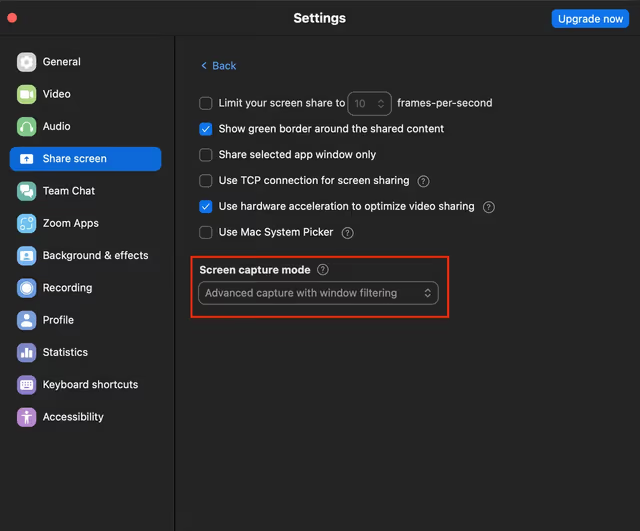
Zoom › Settings › Share Screen › Advanced capture + Window filtering
Mac full-screen share note
On a small number of Mac setups, some WebRTC screen sharing apps may show the overlay only when you share your entire screen. Window sharing and Zoom with Advanced capture work as expected. Test the downloadable app before subscribing. Refunds are not available.
Real-time AI coding help. Full explanations, clean runnable code, and time/space complexity analysis. Covers both LeetCode-style coding rounds and system design interviews. Think of it as a silent AI partner that is always on.
StealthCoder reads coding questions directly from your screen, solves them instantly, and returns the explanation, code, and complexity. All inside a stealthy overlay that disappears from screen shares.
Yes. StealthCoder works for system design too. It can analyze architecture diagrams, suggest scalability patterns, recommend database choices, and help break down distributed systems problems. Works on whiteboard-style and interactive design platforms.
No. Your StealthCoder subscription includes API access. You do not need ChatGPT Plus or a separate key.
We do not publish provider or model names. StealthCoder runs on state-of-the-art models through managed API access and updates as better ones become available.
Yes. Cancel anytime directly from your dashboard. No phone call, no friction, one click.
There is a 7-day free trial. Card required, but you will not be charged if you cancel before the trial ends. Paid plans unlock unlimited usage and priority support.
That is the goal. StealthCoder was built by a former Amazon engineer and tested in real interviews. It gives you a real edge in a format that is otherwise heavily biased against people under pressure.
Yes. As long as the text shows on screen, StealthCoder can read it and generate a solution. No platform restrictions.
StealthCoder captures your primary display. If you use multiple monitors, make sure the coding problem is visible on your main screen before triggering a scan.
StealthCoder does not run inside those sites and does not expose a detectable signal to them. If you get flagged, it is usually from user behavior like rapid pasting, tab switching, or obvious misuse. Use it responsibly.
Proctoring tools can see activity inside their page, like tab switches, paste events, and timing. They cannot directly detect StealthCoder. Your device screen recorders are separate and StealthCoder does not interact with or bypass them.
No. No tool can guarantee outcomes. StealthCoder gives you stealth workflows and guidance. You are responsible for using it intelligently. Edit solutions, avoid suspicious behavior, and follow platform rules.
Mac (Intel and Apple Silicon) and Windows. Both fully supported.
Use the chat widget on the bottom right. We respond fast.
“I built StealthCoder after watching brilliant engineers fail interviews because of a format that has nothing to do with their ability to do the job. I have been on both sides of the table. This tool exists to level the playing field.”
Founder, StealthCoder · Ex-Amazon Software Engineer
Stop panicking mid-interview.
One offer letter pays for years of this. Start your free trial today and walk in with an unfair advantage.
7-day free trial · Cancel anytime · Mac + Windows